Production monitoring software on any TV on the wall.
Open one URL on any TV, type the code it shows into Bulk, and the screen logs itself in and stays on its board. No keyboard, no account per screen.
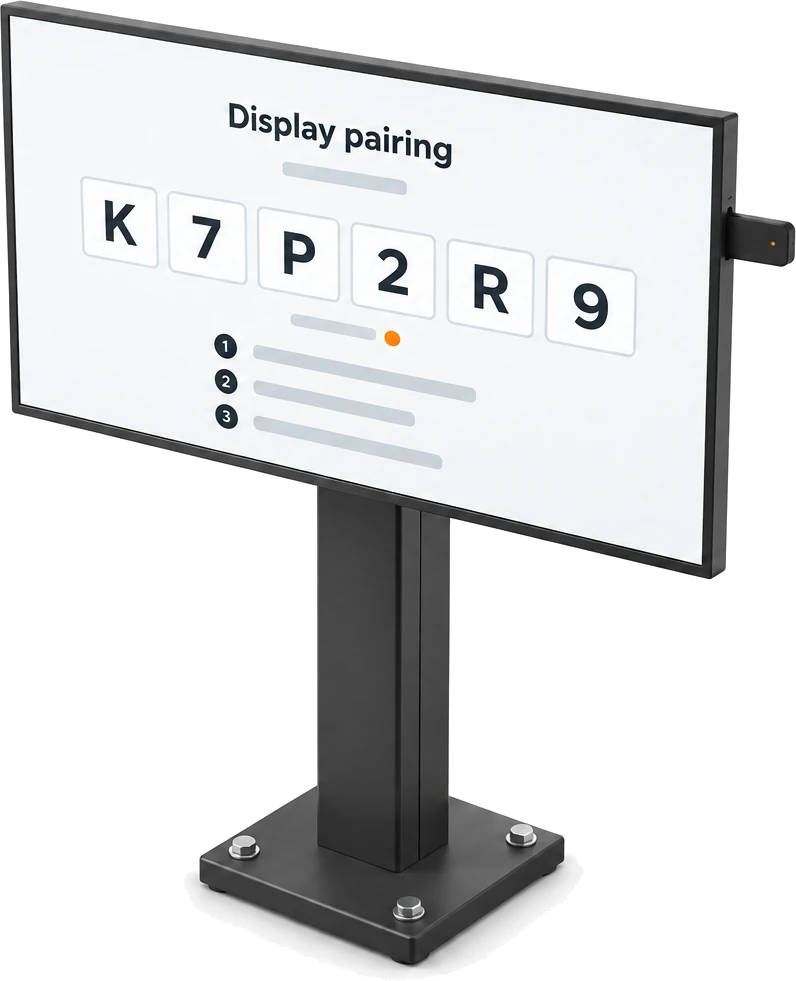
A code on the screen, a board on the wall.
Putting a dashboard on a TV should not mean a shared password typed in with a remote. Open your workspace’s setup address on the screen and it shows a six-character code. Type that code into Displays on your computer, and Bulk creates the screen’s own dashboard user, signs it in and opens its board.
Open one address on the screen
The setup address is your workspace followed by /link-tv, shown with a Copy button on the Displays page. A screen on a local or IP address asks for the workspace first.
Type the code at your desk
Codes are six characters with look-alikes such as O and 0 left out, so they read cleanly from across a room. Linking one needs the Manage dashboard devices permission.
The screen signs itself in
Bulk creates a dashboard user for the screen and hands it a one-time login, cleared the moment it signs in. The screen checks for the claim every three seconds.
Four kinds of board, one per screen.
A visual factory works when every screen has one job. Each display shows exactly one target from its site, chosen in Configure display: an Asset Board, a Teamboard, an OEE Assets dashboard or an OEE People dashboard.
Asset Board
Every station on one board: its state, the jobs on it, how long it has been that way and its 24-hour OEE.
Teamboard
The plant’s SQDCP board for the daily huddle, with a safety cross or gauge heading each column.
OEE Assets
One timeline row per machine: running time, downtime by loss category, output and OEE for the day.
OEE People
The same timeline per operator, for a supervisor’s screen.
Readable from across the floor.
A production dashboard on the wall has to fit the panel, stay current and never ask for a click. Bulk’s boards open full screen with no sidebar, update as work is recorded at the station, and keep themselves on today.
Fits the screen
On a 4K TV, or with Display size turned down on that browser (70 to 100 percent), the asset board fits every card on screen without scrolling.
Always on today
A Teamboard moves to the new day’s report after midnight by itself, and asset board figures reset at each board’s day reset time.
Live, not reloaded
Boards change as operators start timers, pause and count at the workstation, so nobody refreshes the page.
Every screen in the building, on one list.
Displays, still marked Beta in settings, lists every shop floor dashboard screen in the workspace: what it is pointed at, whether it is live and when it was last seen. A linked asset board or teamboard screen that stops checking in for five minutes shows as Offline.
Four states
Live screens have checked in within five minutes. Offline ones are linked but quiet, Pending ones have shown a code but are not linked yet, and Revoked ones are signed out.
Last seen, at a glance
Asset board and teamboard screens check in every 30 seconds and each row says when it was last seen. OEE dashboard screens do not check in, so they show as Offline.
Unused codes tidy themselves
A code nobody claims is swept off the list within ten minutes of expiring, so Pending always means a screen that is really waiting.
Change the board, keep the pairing.
Moving the huddle’s visual management board to another screen, or a screen to another board, is a setting rather than a new pairing. Configure display sets a screen’s name, role and target, and saving it is all it takes.
Waits until you choose
A linked screen with no target shows “Waiting for an admin to assign a dashboard route” and opens its board seconds after you save.
Re-point without re-pairing
Change the target at any time. The screen keeps its dashboard user, and an asset board or teamboard screen moves to the new board without anyone touching it.
Set up before the claim
A name, role and board saved on a pending screen are kept when its code is claimed.
No shared password on the wall.
A screen on the floor is more than digital signage for manufacturing: it is signed in to your plant’s data. So each one gets its own dashboard user and a role you choose, its pairing code is short-lived, and every step is written to the activity log, your audit trail for screens.
Its own user, your choice of role
Each screen signs in as a dedicated dashboard user. Configure display sets its role, with the read-only Dashboards viewer role picked by default, and you can only give it a role you are allowed to grant.
Codes that run out
A code lasts five minutes and is stored only as a hash. When the screen swaps it for a new one, the previous code works for one more minute, so nobody loses it halfway through typing.
A login used once
The screen’s login is handed over once and cleared as soon as it signs in, or it expires after five minutes if it never does.
Revoke or delete
Revoke deletes the screen’s user and signs it out but keeps it on the list. Delete permanently removes the record too, and the screen must pair from scratch.
What a TV dashboard has to answer.
A TV dashboard is a board that runs full screen on a wall display, signed in on its own and showing live figures from the floor. Before a plant puts one up, it asks the same few questions. Here is how Bulk answers each, and where you read it.
| The question | How Bulk handles it | Where you read it |
|---|---|---|
| How does the screen sign in? | Claiming its code creates a dedicated dashboard user and hands the screen a one-time login, cleared as soon as it signs in. | The screen’s row in Displays, with its user address |
| Who can pair a screen? | Anyone with the Manage dashboard devices permission, using a six-character code that expires after five minutes. | Link a display, in Settings, Organization, Displays |
| What will it show? | One target from the selected site: an Asset Board, a Teamboard, or an OEE Assets or OEE People dashboard. | Configure display, Display target type |
| What can it see? | Whatever the role you set allows; the read-only Dashboards viewer role is picked by default. | Configure display, Role |
| Is it still on? | Live, Offline, Pending or Revoked, with when it was last seen; five minutes without a check-in means Offline. | The Fleet strip and the Devices list |
| How do we move it to another board? | Change its target and save; no new pairing, and asset board and teamboard screens follow by themselves. | Configure on the row |
| How do we take it down? | Revoke deletes its user and signs it out but keeps the row; Delete permanently removes the record too. | The row menu: Revoke display, Delete permanently |
| Who changed what? | Every code request, claim, change, revoke and delete is written to the activity log with who did it and when. | Settings, Organization, Activity logs (audit trail) |
What the wall is reading.
A screen is only as good as what feeds it. Every board a display shows is kept current by another Bulk app, so the TV in the press shop and the supervisor’s desk read the same figures.
- ProductionTimers, pauses and counts at each station set the states a wall board shows.
- OEE & AnalyticsAsset boards, their assets and output KPI are set up under Settings, OEE.
- DashboardsA screen can open the OEE Assets or OEE People dashboard full screen.
- TeamboardsA Teamboard screen opens the plant’s SQDCP board and rolls to the new day.
- PeopleTime-clock tablets pair with the same code and hold only clock-in rights.
- Hub & HomeDisplays lives in the Hub’s settings, with users, roles and the activity log.
Questions, answered.
What is production monitoring software?
Software that shows what the floor is doing right now: which machines are running, paused or stopped, what each one is working on and where time is being lost. In Bulk that picture comes from the work operators already record at the station, and Pulse puts it on any screen: pair a TV and it shows the site’s Asset Board, a Teamboard, or the OEE Assets or OEE People dashboard, and keeps it there.
What is Bulk Pulse?
Pulse is how Bulk puts a TV dashboard on the shop floor. Open your workspace’s setup address on any screen with a web browser, type the six-character code it shows into Settings, Organization, Displays, and the screen signs itself in and opens the board you chose: an Asset Board, a Teamboard, or an OEE Assets or OEE People dashboard. Displays is still marked Beta in settings.
How do I put a dashboard on a TV?
On the TV, open your workspace address followed by /link-tv; the Displays page shows it with a Copy button. The screen shows a six-character code. On your computer, choose Link display, type the code and confirm, then use Configure to pick what the screen shows. The code is typed at your desk, not on the TV.
What do I need at the screen?
A screen that can open a web page and reach your Bulk workspace. There is no app to install: the pairing page and the boards are ordinary Bulk pages.
How long does a pairing code last?
Five minutes. When it runs out, the screen asks for a new one by itself, and the code it replaced still works for one more minute so you can finish typing it.
Can one screen cycle through several boards?
No. Each display shows exactly one board or dashboard at a time. To show more, use more screens, or change a screen’s target in Configure display whenever you need to.
Does every TV need its own login?
Yes, and Bulk makes it for you. Claiming a code creates a dedicated dashboard user for that screen and hands it a one-time login, which is cleared the moment the screen signs in. Nobody chooses or types a password.
Is a TV on the wall a security risk?
Each screen runs as its own user with the role you set, the read-only Dashboards viewer role by default. Linking a code needs the Manage dashboard devices permission, and codes expire after five minutes and are stored only as a hash. Revoking a screen deletes its user and signs it out. Every pairing, change, revoke and delete is recorded in the activity log.
How do I know if a screen has gone dark?
Displays lists every screen as Live, Offline, Pending or Revoked, with when it was last seen. Asset board and teamboard screens check in every 30 seconds while they are showing, and one that has not checked in for five minutes is marked Offline. Screens showing an OEE Assets or OEE People dashboard do not check in, so Displays lists them as Offline even while they are working.
Can I change what a screen shows without pairing it again?
Yes. Configure display changes a screen’s name, role and target. A screen waiting for its route opens the board within seconds of saving, and a screen already on an asset board or teamboard moves to the new target on its own.
What is the difference between revoking and deleting a screen?
Revoke deletes the screen’s dashboard user and signs it out but keeps it on the list as Revoked, so pairing it again from the same browser brings back its name and board. Delete permanently removes the record as well, and the screen starts from scratch.
Can the same pairing set up a time-clock tablet?
Yes. A tablet opened on the time clock page shows a six-character code too, paired from Settings, People, Time clock. It holds only the clock-in permission, appears in Displays with a tablet icon and is managed from People.
Put the floor on the wall.
Start a free trial and pair a TV: the address on the screen, the code typed into Bulk, your board on the wall. No card needed.