Manufacturing inventory management software: where it saves
Learn which manufacturing inventory controls can cut avoidable costs, compare software approaches and use a practical demo test before you buy.

Illustration: a full parts store does not necessarily mean the next job has everything it needs.
Manufacturing inventory management software tracks the materials a plant receives, holds, uses and finishes. It can reduce avoidable costs when those records help someone make a better decision: catch a shortage before releasing a job, use existing stock before ordering more, or find why a balance keeps drifting.
Buying the software does not create those savings on its own. The useful question is which costly decisions your current records get wrong, and whether the proposed system gives the person making them better information in time to act.
Start with a distinction that matters on every floor: stock on hand is not the same as stock available for the next job.
What manufacturing inventory management software needs to track
A manufacturing inventory system has to follow material as its condition and purpose change. Raw material becomes partly completed work, then a finished product. Some stock supports the process without becoming part of the product, such as cutting discs or cleaning supplies. Software that records a purchase and a sale may still leave gaps between those events. Fishbowl’s manufacturing overview describes this wider scope across raw materials, work in progress and finished goods.
For a buyer, the first task is to decide which of those records must live in the new system.
| Stock to follow | What the record needs to explain |
|---|---|
| Raw materials and bought-in components | Quantity, unit, location and any required lot, inspection or expiry status |
| Work in progress (WIP) | Material committed to unfinished work and the job or operation holding it |
| Finished goods | What has been completed, what is released and what is committed to an order |
| Production consumables | Receipts, recorded use, adjustments and replenishment thresholds |
Then separate physical quantity from availability. A part may be in the building but reserved for another order. It may be awaiting inspection, rejected or expired. A supplier’s promised delivery is a further category, not material ready to issue today. Vendors define these fields differently; MRPeasy’s inventory manual shows how it separates stock, bookings, rejected items and expected receipts. Have each vendor explain its calculation using your own stock states.
A shelf count can hide a shortage
Consider a hypothetical assembly cell with 100 brackets physically on hand. Of these, 40 are reserved for an earlier job and a separate 15 are on quality hold. That leaves 45 available. A new job needs 60, so it is short by 15 despite the healthy-looking shelf count.
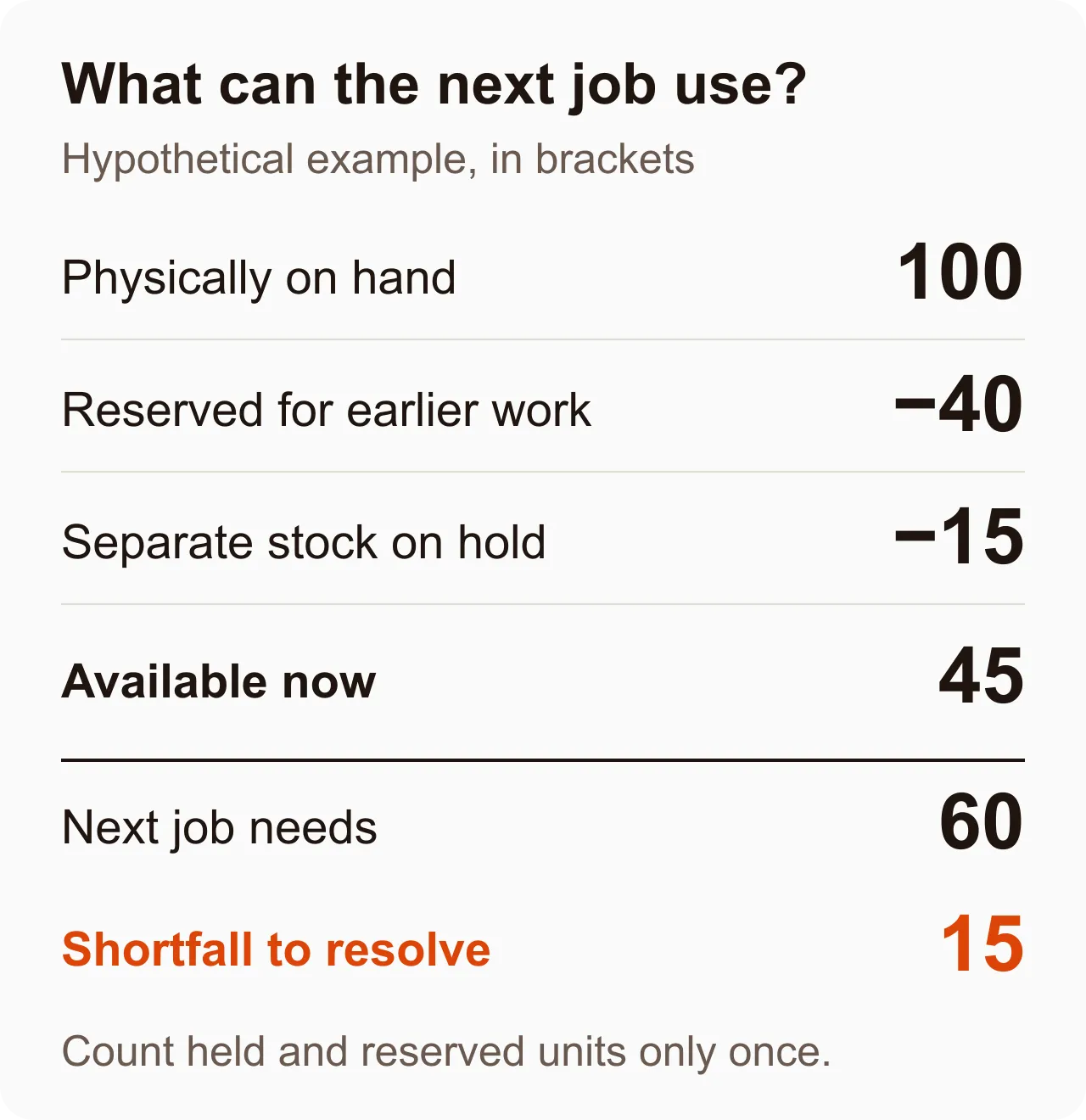
Finding that gap before the job starts gives the planner a choice: resolve the hold through the proper quality process, obtain more material or change the plan. Discovering it after setting up the cell leaves fewer options. The software is useful because it brings the decision forward.
Where the cost reduction comes from
Build the business case from incidents your plant can explain. A general promise of “better visibility” is difficult to test. A record of emergency freight caused by stock errors is much more useful.
Fewer emergency purchases
A replenishment signal needs time to work. If an item takes several days to arrive, an alert raised only when the shelf is empty comes too late. Review the trigger against actual usage, supplier lead time and the buffer your operation needs.
Also distinguish a low-stock alert from material requirements planning (MRP). An alert identifies a threshold crossing. MRP uses demand, component requirements and timing to work out what will be needed. A bill of materials (BOM) defines the components and quantities needed to make a product. If shortages depend on the mix of jobs coming next, test that planning logic as well as the alert.
Compare avoidable rush freight and emergency orders before and after a pilot. Separate inventory-record errors from genuinely late suppliers or unexpected demand. Software may expose all three, but it cannot fix them in the same way.
Less money tied up in excess stock
When people cannot trust a balance, ordering another box can feel safer than searching for the first one. A usable location record and credible quantity can make that precaution unnecessary. Reviewing stock with little recent movement can also reveal items whose demand has changed.
Treat a reduction in stock held as a release of cash, not an annual saving that repeats indefinitely. Count recurring savings separately, such as less external storage or fewer items written off. Do not assume that an expensive spare should be removed just because it moves slowly; the consequence of not having it may justify keeping it.
Less unexplained usage and fewer repeated corrections
A total says how much is left. A movement history helps explain how it got there. For manufacturing inventory tracking, ask to see receipts, issues to work, returns and adjustments with a reason and a reference to the relevant activity.
Suppose a hypothetical balance starts at 100 cutting discs. Stores receives 50, production records using 12, and a controlled physical count later finds 141 rather than the recorded 138. The correction should add three with a reason while keeping the earlier events visible.
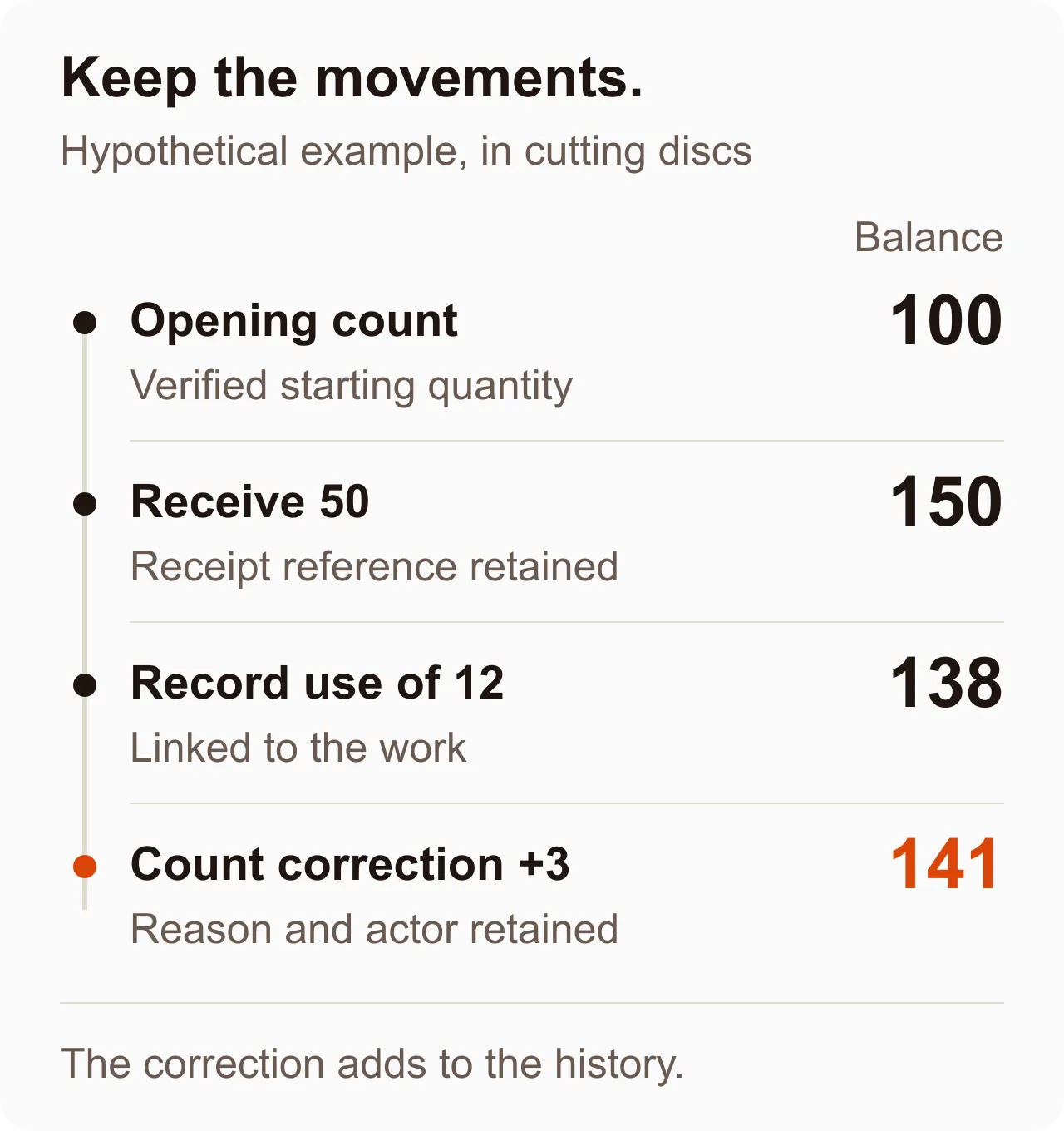
Repeated corrections are a prompt to investigate the process. Is a box being entered as one item when production issues individual units? Are unused materials returned without being recorded? Is the same withdrawal being entered twice? Fixing the cause is more valuable than repeatedly resetting the balance.
“Real time” depends on when people and connected systems record events. If someone takes material without recording it, a live screen can display a stale physical quantity. Keep physical counts as an independent check, even when software reconciles its own records.
Choose the software around the missing control
The products appearing in inventory searches cover different jobs. A stock-tracking tool, an assembly system and a manufacturing ERP may all describe themselves as inventory software. Compare the work they can complete, including exceptions, before comparing the length of their feature lists.
The following are starting points based on each vendor’s published scope, not hands-on rankings. Confirm the edition, configuration and commercial terms for the functions you need.
| Product | Published scope relevant to manufacturing | A useful demonstration to request |
|---|---|---|
| MRPeasy | Available, booked and expected stock; production planning; purchasing; lot and serial tracking | Reserve shared components for two jobs, delay a receipt and show the revised plan |
| Fishbowl | Manufacturing orders, BOMs and barcode workflows, including cycle counts | Build part of an order, record actual component use and count the remaining stock |
| Unleashed | Raw materials, WIP and finished goods; single- and multi-level BOMs; batch and serial tracking | Run an assembly with a subassembly and show how quantities and costs change |
| DELMIAWorks | Inventory within manufacturing ERP, including outsourced stock, non-allocate locations and WIP cost roll-up | Send work to a subcontractor, receive it back and trace its quantity and cost |
Keep general stock tools in the evaluation if they solve the actual problem. Sortly publishes barcode and QR tracking with low-stock alerts, for example. Those functions may be relevant to a stores team. They are not, by themselves, evidence that a system can plan a multi-stage build. Require a demonstration of that separate need.
Where Bulk fits
Bulk is one operating system for the plant, installed one app at a time. Its Inventory & Stock capability focuses on consumable variants: stock balances by site, receipts, adjustments, movement history and threshold alerts. With tracking enabled, recorded production usage deducts stock and links the movement to the work. Reversing recorded usage can put the quantity back through a further movement.
That is relevant when a plant wants consumable records connected to the production activity using them. Stock adjustments require a reason, and the movement history retains before-and-after balances. The useful test is to receive a consumable, record its use against work and inspect the resulting balance and history.
Bulk’s shared data thread extends from the customer order to the invoice. Its consumable inventory scope should still be evaluated on its own merits. Requirements such as BOM-driven purchasing, component reservations, warehouse picking or formal WIP valuation need their own evidence; a connected production record alone does not establish them. You can start a free Bulk trial and confirm the workflow on your own consumables during evaluation.
Run one job through the demo, including the mistakes
Give every vendor the same small, synthetic dataset. Use one representative product, its components, a production consumable and two competing jobs. Include the unit conversions and quality states your floor actually needs.
- Receive a partial delivery. Show what arrived, what is still expected and which stock is usable. If you buy boxes and issue pieces, check the conversion.
- Commit stock to the first job. Check what the second job can still use. Put a separate quantity on hold and inspect the availability calculation.
- Record production. Issue material, complete part of the job and record scrap or unused returns. Follow quantities into WIP and finished goods where required.
- Correct a mistake. Reverse an incorrect usage entry or correct a count. Inspect the reason, actor and history rather than just the new total.
- Cross a replenishment threshold. Show who receives the signal, what they can do next and what happens when stock recovers.
- Check the handoffs. Where another system remains, trace a receipt, usage correction and shipment across it. Ask how a failed or duplicate update is detected and recovered.
Have a stores operator and a production operator perform their own steps. Note where they need help, how many entries they make and whether the workflow works with the actual scanner, terminal or phone you intend to use. If connectivity is unreliable, ask the vendor to demonstrate loss and recovery rather than accept an untested offline claim.
Include hosting and operating costs
For a cloud proposal, establish who handles updates, backups, recovery and data exports, and what happens if the site loses connectivity. For an on-premise proposal, name the team responsible for the server, patching and tested restoration. Local hosting does not automatically mean every workflow works offline.
Compare the whole operating cost: subscription or licence, implementation, data cleanup, devices, training, integration maintenance and internal support. Test realistic transaction volumes and concurrent users with the vendor before assuming a successful small demo establishes capacity for every site.
Prove the savings in a limited pilot
Choose one material family and one production area with recurring, measurable problems. Clean the item list and units, verify opening quantities, define who records each movement and agree who investigates differences. Cover at least one replenishment cycle and a physical count before widening the rollout.
Track four things consistently: emergency orders caused by incorrect stock information, time spent searching or reconciling, discrepancies found in physical counts, and stock held without a current need. Keep the count method and the mix of work comparable. Otherwise a quieter month can look like a software benefit.
For a hypothetical business case, assume measured changes avoid $600 a month in emergency freight and free 20 hours previously spent reconciling records. At an assumed internal rate of $35 an hour, that time represents $700 of capacity. With $500 a month in recurring software and support costs, the potential net benefit is $800 a month. A $6,000 setup cost would take 7.5 months to recover if both benefits are realised.
If the freed hours do not reduce spending, the cash benefit in that example is only $100 a month and cash payback is 60 months. The time may still be valuable, but do not present it as money saved unless you can explain how it changes cost or output. These figures are illustrative assumptions, not vendor prices or promised results.
Take your last three inventory-related delays to the evaluation. For each one, identify the missing record, the person who needed it and the action they could have taken. Then ask the vendor to run that situation. A system earns its place when the right person can spot the problem and act before it becomes another delayed job.