Production tracking software: 5 benefits to test on the floor
See how production tracking software helps you locate jobs, reconcile quantities, plan materials and investigate delays, with practical tests for each benefit.

Illustration: parts can finish machining and still have a long wait ahead.
Production tracking software records where a job is, what has happened to it and what still needs to be done. Depending on the system, updates come from operators, scans, connected machines or a combination of these. The useful result is a current record that production, planning and quality can act on.
For a plant manager, five benefits are worth testing: finding stalled work sooner, keeping quantities accurate, making better material decisions, tracing affected parts and using recorded delays to improve the process. Each depends on capturing the right detail. A screen that says “in progress” cannot tell you which of those problems needs attention.
This guide follows a hypothetical order for 120 machined housings. The quantities and situations are worked examples, not customer results. Use the same tests with one of your own orders when evaluating software.
What should production tracking software track?
Start by separating the job from the machine. A machine can be running while an urgent order waits elsewhere. Equally, a job can be progressing through a manual inspection while no machine is running.
That distinction appears in the products sold under this name. MachineMetrics describes machine and operator data collection, including part counts and downtime reasons. MRPeasy’s production tracking page also covers manufacturing orders, material use and stock. These are overlapping scopes. Ask each supplier to show the particular workflow you need.
For job tracking, request a record with enough information to answer these questions:
| Information | What it lets the team decide |
|---|---|
| Order, part and revision | Is this the correct work and instruction set? |
| Current operation and physical location | Where should the next person look? |
| Quantities by stage and disposition | How many are accepted, waiting, held or scrapped? |
| Last event, time and person or data source | How current is this answer, and where did it come from? |
| Blocker, next action and owner | What needs to happen before work can move? |
Treat “real time” as a capture requirement. If the operator records a move at 14:00 that happened at 10:00, a fast dashboard still spent four hours showing an old position. Ask whether the record distinguishes when work happened from when it was entered.
1. Find waiting work before it becomes a delivery problem
Work in progress (WIP) is work that has started but is not yet finished. To manage it, you need to see the queues between operations as well as the work currently running.
Suppose the housings finish machining at 10:00 and reach the inspection queue at 10:15. At 14:00 they are still waiting. A status of “machining complete” hides the next decision. A record showing “awaiting inspection since 10:15” tells the supervisor which queue to investigate.
Build the tracking process around these handoffs. Record arrival at a queue, the start of work and completion separately where the distinction matters. A machine stop reason explains why an asset stopped; it does not automatically explain why a cart elsewhere has not moved.
Give someone responsibility for reviewing ageing work. Making a queue visible only helps if the team can decide whether to change priorities, arrange inspection or resolve a missing instruction.
Test it: move a test job into a waiting state. Ask a supervisor who did not make the update to find its location, waiting time and next action. Then compare the record with the physical cart.
2. Reconcile quantities when a batch splits
An order rarely stays in one neat state. Some units pass inspection while others wait, need rework or become scrap. A single completion percentage can conceal that split.
In our example, 120 housings have reached final inspection. At this moment, 70 are accepted, 30 await inspection, 12 await rework and 8 are scrapped. These are mutually exclusive states: every housing belongs to exactly one group at this snapshot.
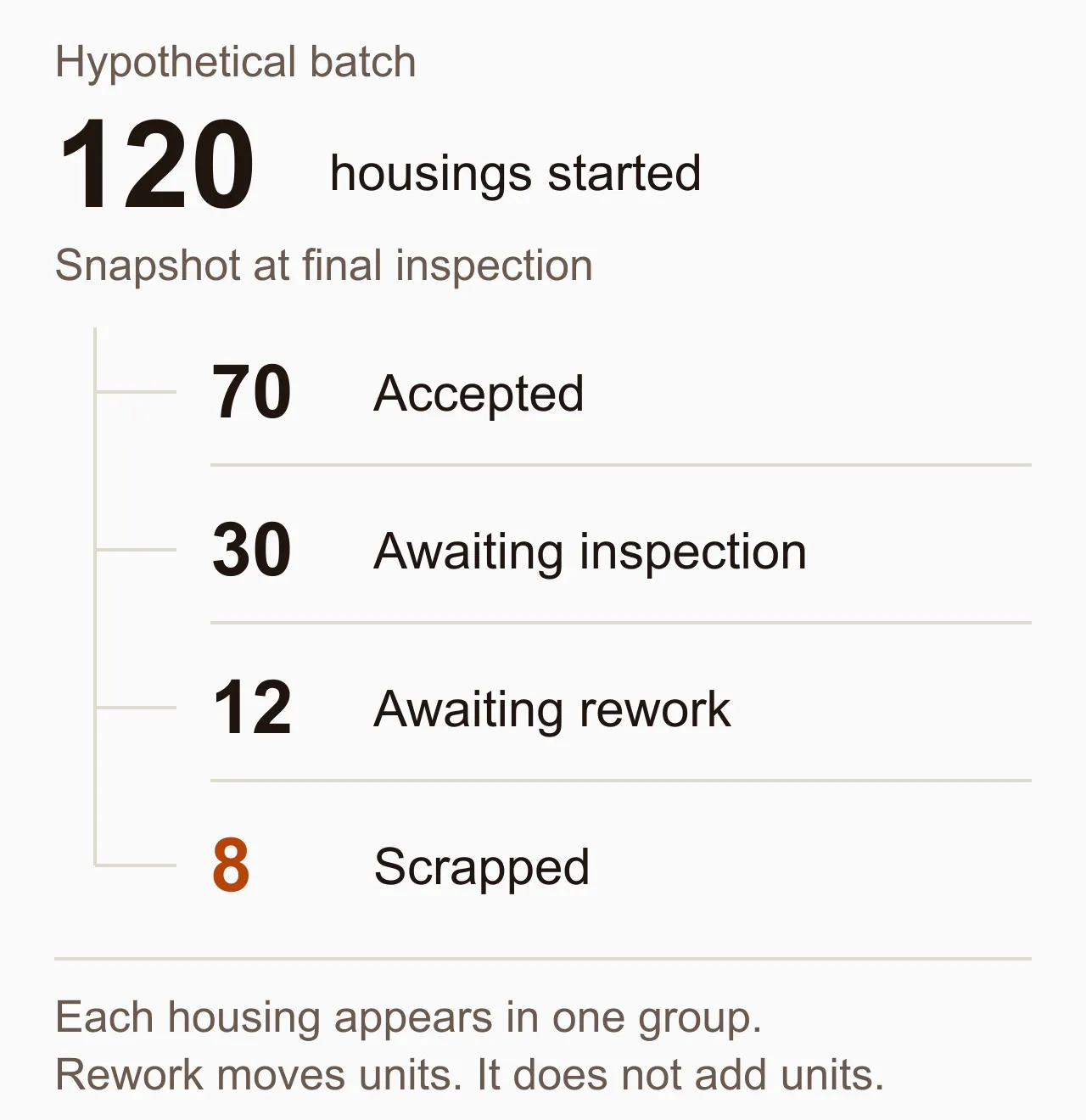
If the 12 reworked housings later pass inspection, move them into the accepted group. Do not count them as 12 additional housings started. If the customer still needs 120 good units, the eight scrapped housings require replacements even if all the pending work passes.
Keep a current quantity separate from the history used to calculate it. A mistaken entry should be correctable without making the original entry and the reason for the change disappear. Also establish what each counter means: an inspection count may include a part already counted at machining, so adding both counters would double-count physical units.
Bulk provides one concrete example of this approach. Its Production app records output against job steps. When an output batch quantity is corrected, it writes a linked adjustment and records the old quantity, new quantity and correction reason. That preserves the explanation behind the revised total.
Test it: enter a quantity, correct it and inspect both the current total and its history. Then send a smaller quantity through rework. Check that the original units have not become extra output in the final count.
3. Make material decisions from recorded consumption
Material tracking software for manufacturing needs to distinguish what is on a shelf from what is available for the next job. A useful evaluation should cover reservations, issues to production, actual consumption, returns and scrap wherever those events apply to your process.
Use the eight replacement housings to test the connection. The planner needs to know whether suitable blanks remain available, whether another order has reserved them and whether the replacements need a different material lot. A production scrap count alone cannot answer those stock questions.
Ask how the software records consumption. Does it assume the planned amount was used when an operation finishes, or record actual use? Planned consumption can simplify entry for predictable work. Actual recording can expose excess use, but adds a task that someone must perform reliably. The right choice depends on the material and the process.
Be equally explicit about units. If stores issues kilograms and production reports pieces, establish how the conversion works and how offcuts or unused material return to stock. A tidy report is little help if it quietly treats those quantities as interchangeable.
Test it: issue material, record some scrap and return the unused balance. Check the job’s material history and the stock available for another order. Use a material with a real unit conversion or partial return if your plant handles either.
4. Trace the affected parts when something fails
Production tracking answers where work stands now. Manufacturing traceability asks how particular units or batches got there: which material was used, which operations were performed and which inspection results belong to them.
If a material concern arises, a job number alone may be too broad. Decide whether your process needs identification by order, batch or individual serial number. Then test what happens when a batch splits, combines with another batch or visits an outside processor. Those are the moments when an unrecorded change can break the trail.
For the 12 housings awaiting rework, keep the original inspection result, the decision to rework and the later acceptance result connected. The new result should explain the outcome without erasing why the parts needed attention.
Ask separately about holding work. Displaying a warning, preventing the next operation and preventing dispatch are different controls. Have the supplier demonstrate each control you require with the roles your team actually uses. A digital hold also needs a physical method of keeping affected parts identifiable on the floor.
Test it: choose a sample lot and ask the team to find the jobs and units associated with it. Then work backwards from a finished unit to its material and inspection records. Record any link that still depends on someone’s memory.
5. Improve the process using comparable records
Once events have a consistent meaning, they become useful for investigating repeated delays. Start with a question the plant can act on, such as why one family of parts spends so long waiting for inspection.
If inspection starts at 14:00, the interval from the housings’ arrival at 10:15 is three hours and 45 minutes. That is queue time. Keep it separate from the time spent inspecting, the machine’s downtime and the order’s total elapsed time. They describe different problems and may need different responses.
Compare similar work across several runs before changing the process. Keep batch size, part family, shift and unusual events visible. A longer wait on a day with urgent rework does not, by itself, establish that the inspection operation needs another person.
Check the completeness of the records too. A chart built from jobs with missing arrival events may make the queue look shorter than it was. Include the number of jobs missing the timestamps needed for the measure, and investigate the recording gap.
Use equipment measures alongside the job history when they help. Bulk’s guide to OEE explains availability, performance and quality. Keep that equipment view distinct from the question of how long an order waits between operations.
Test it: select several completed jobs and reproduce one reported waiting time from the underlying events. Check whether the report excludes incomplete records and makes that exclusion visible.
Choose software with one complete trial order
Use the five tests together. Start with a manageable product family and define what “started,” “complete,” “accepted” and “available” mean before configuring screens. Agree who records each handoff and who responds when work is blocked.
Run the trial through a shift change, a split quantity, a correction and a failed inspection. Also test an interrupted connection: what does the operator see, how is an uncertain submission recovered, and how does the system avoid counting the same entry twice? Have the supplier demonstrate the behaviour instead of assuming that a mobile screen provides offline operation.
Before a wider rollout, check that the people using the record can answer the original questions without rebuilding it in a spreadsheet. Include devices, configuration, training, data preparation and ongoing administration in the buying decision.
If you are evaluating Bulk, start with the production overview and bring an order that regularly loses its place between departments. Ask to follow its quantities and corrections through the workflow. The evidence you need is a record your team can use to decide what happens next.