 Engineering change requestSeparate a proposed change from approval, effectivity and verified implementation.
Bill of materials
Keep component quantities tied to their immediate parent and the assembly revision.
What it's for
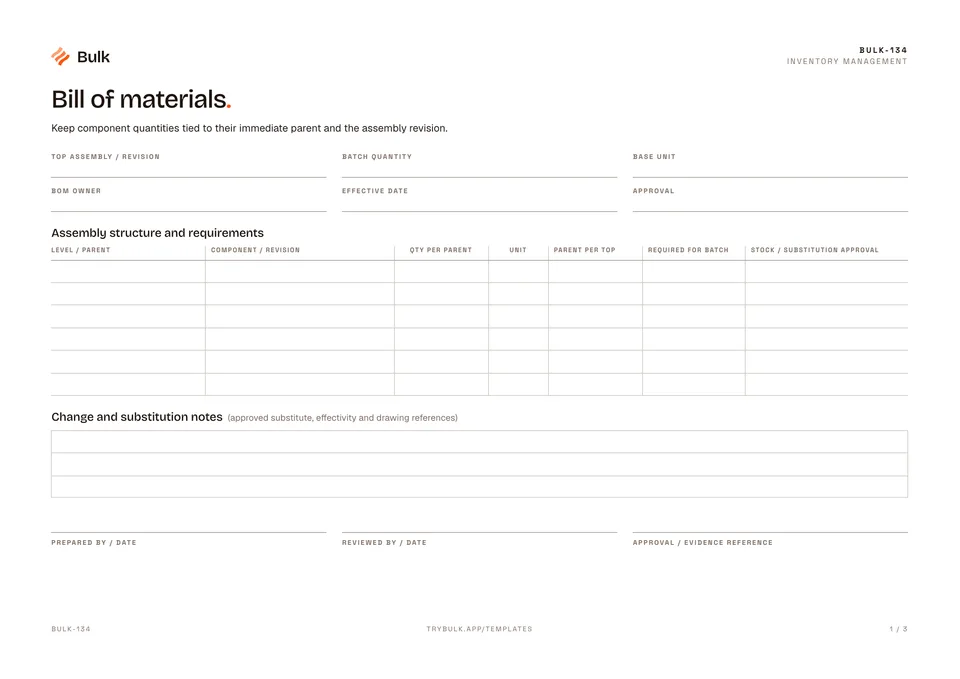
Keep component quantities tied to their immediate parent and the assembly revision. This free bill of materials template, or BOM template, lays out a multi-level structure with explicit multipliers so a batch requirement can be checked line by line.
What you can download
Available files: PDF, Excel. Each PDF includes the blank form first, a fictional completed example and instructions. The Excel workbook includes an unused template and a separate completed example, with labelled inputs, calculation cells and print settings. The download is free; enter your email to receive a secure link valid for seven days. Product-news consent is optional.
The blank BOM is one A4 landscape page. The header records the top assembly and revision, batch quantity, base unit, BOM owner, effective date and approval. The assembly structure table has one row per component path, with columns for level and parent, component and revision, quantity per parent, unit, parent quantity per top assembly, quantity required for the batch, and stock or substitution approval. A notes box below holds approved substitutes, effectivity and drawing references.
What a good bill of materials includes
- A controlled header. Top assembly, revision, owner, effective date and approval, so everyone builds from the same version.
- Level and immediate parent on every row. The parent is what the quantity multiplies against.
- Part number and revision for each component, matching the controlled drawing.
- Quantity per parent and its unit. Keep “each”, “set”, “m” and “kg” separate; they cannot be added together.
- An explicit multiplier to the top assembly and batch, so the batch requirement can be checked by anyone.
- Change and substitution notes that say which substitute is approved, from when and on whose authority.
Single-level vs multi-level BOM
A single-level BOM lists only the direct children of one assembly. A multi-level BOM shows each sub-assembly and its own components beneath it, which is what the level and parent columns on this template are for. Engineering teams sometimes keep an engineering BOM (how the product is designed) separate from a manufacturing BOM (how it is built and kitted); this worksheet suits either, as long as the header makes clear which one it is.
How to build a BOM with this template
- Record the top assembly, its revision, the batch size and the base unit, and name the owner.
- List the level-1 components under the top assembly, one row each, with part, revision, quantity per parent and unit.
- Under each sub-assembly, add its components at level 2 with the sub-assembly as their parent. Expand deeper levels on another sheet with explicit path references.
- For each row, multiply quantity per parent by the parent’s quantity per top assembly and by the batch size.
- Only then compare the gross requirement with stock, and record any approved substitution against the drawing.
- Get the BOM approved and re-issue it with a new revision when the design or an approved substitute changes.
Completed manufacturing example
A batch of ten frames needs two rails per frame, giving 20 rails. Each frame also needs one leg set containing four legs, giving 40 legs. The example keeps each child tied to its immediate parent and drawing revision.
Gross requirement is quantity per parent × parent quantity per top assembly × batch size. Compare available stock afterward. Do not add an assembly header to its child quantities or combine different units into one total.
The top assembly is FRAME-10 at revision B, batch 10. At level 1, RAIL-1 (revision C) is needed twice per frame, so 20 for the batch against 18 in stock, and LEG-SET (revision A) once per frame, so 10. At level 2 under LEG-SET, LEG-2 (revision B) and PAD-3 (revision A) are each needed four times per set, so 40 of each. Stock appears for comparison only; it is not subtracted from the gross requirement.
Common BOM mistakes
- Mixing up quantity per parent and quantity per top. Legs are four per leg set; it is the leg set’s own quantity per frame that carries them up to the top assembly.
- Adding header quantities to children. The 10 leg sets are made from the 40 legs and 40 pads, not in addition to them.
- Adding different units together. Metres of tube and pieces of bracket do not make one total.
- Netting stock too early. Calculate the gross requirement first, then compare stock.
- Undocumented substitutes. A substitution without approval and effectivity breaks traceability.
When to use this template
A controlled BOM worksheet with explicit multipliers, not an MRP engine or purchasing system.
Continue with Engineering change request, Material Requisition Form, Stocktake and cycle count.
For shared records, evidence and follow-up, explore Bulk inventory. Start a free trial to run it live, no card needed.
How to use it
- Use one row per component path. Quantity per parent is distinct from quantity per top assembly.
- Multiply parent quantity per top by quantity per parent and batch size. Expand deeper levels on another sheet with explicit path references.
- Keep each unit separate and confirm substitutions against the controlled drawing. Compare stock only after calculating gross requirements.
Key features
- Assembly structure and requirements
- Change and substitution notes
Ideal for
- Engineering and stores teams reviewing component quantities and revisions
Common uses
- Calculating gross component requirements for a defined assembly batch
Questions, answered.
01
What is a bill of materials?
A bill of materials (BOM) is the structured list of every component, sub-assembly and raw material needed to make one product, with the quantity of each per parent and the revision it applies to.
02
What should a BOM template include?
The top assembly and revision, batch size and base unit, an owner, effective date and approval, then one row per component with its level and parent, part and revision, quantity per parent, unit, parent quantity per top assembly and the requirement for the batch, plus notes on approved substitutions.
03
What is the difference between a single-level and a multi-level BOM?
A single-level BOM lists only the direct components of one assembly. A multi-level BOM also shows the components of each sub-assembly, level by level, so every part traces back to its immediate parent.
04
How do you calculate component requirements from a BOM?
Multiply quantity per parent by the parent's quantity per top assembly and by the batch size. In the example, 4 legs per leg set × 1 leg set per frame × 10 frames = 40 legs.
05
Is the BOM template available in Excel?
Yes. The download includes an Excel workbook with an unused template and a separate completed example, labelled inputs, calculation cells and print settings, as well as the printable PDF.
Related templates.
Engineering change requestSeparate a proposed change from approval, effectivity and verified implementation. Material Requisition FormName the requesting department, job, cost centre, priority and need date.
 Stocktake and cycle countCount by location and lot before comparing with a frozen system snapshot.
Turn the form into a live workflow.
Bulk connects the same checks, evidence, owners and approvals to the work happening on your floor.