Maintenance Log: What to Record, With a Worked Example
What a maintenance log is and what to record in each entry: the asset, the date and reason, who did the work, the result and the next action. With an example.

Illustration: the removed part and its service record belong to the same equipment history.
A maintenance log records which machine was worked on, what happened, who did the work, the result, and what needs to happen next. Those five field groups let the next technician pick up the history without asking the previous shift to explain it.
“Bearing replaced” leaves too much unanswered. Which bearing? What prompted the replacement? Was the machine tested afterwards? Is there still a follow-up job open?
This guide shows how to capture those answers without turning every service visit into a report-writing exercise. It is written for people maintaining production equipment, with a worked example you can adapt to your own machines.
Need a starting sheet? Get Bulk’s free equipment maintenance log PDF. The page offers an emailed download link. The PDF includes asset identification, a maintenance checklist, parts used, notes and signatures. For the fuller record described here, add the next due task and separate downtime from labour time in your own log or a machine downtime log.
What is a maintenance log?
A maintenance log is the history of work carried out on an asset. It can include planned preventive maintenance, inspections and repairs after a fault. A maintenance schedule records what is due; a procedure describes how to do it. Keep those roles clear even if the documents share a workbook.
Think of one equipment record containing many service entries. Each entry should point to a specific visit or work order, so the original checklist, photographs and parts details can be found again.
The format depends on the equipment. A vehicle log may need mileage, while a production machine may need operating hours or cycles. For comparison, Vertex42’s vehicle maintenance log includes service date, work performed, mileage and cost. The useful principle is to record usage in the unit that your maintenance plan actually uses.
What to record in a maintenance log: five field groups
1. An asset identity that stays consistent
Put the asset ID, machine name and location at the top of a paper record. Add the serial number when it helps distinguish otherwise identical equipment. In a spreadsheet containing several machines, include the asset ID on every entry so it stays attached when rows are sorted or filtered.
Choose one name for each asset and use it everywhere. “Press 2”, “blue press” and “old press” should not become three separate histories. If a machine moves, record its new location while keeping the same asset ID.
Give the maintenance entry its own reference too. An asset ID tells you which machine; a work-order or log-entry number tells you which piece of work.
2. The date, task and reason for the work
Record the actual service date separately from the planned due date. Add the time when more than one shift or intervention could otherwise be confused. Use an unambiguous date format, such as 2026-08-14. Where the maintenance plan uses a meter, record its reading and unit at the time of the work.
Then distinguish the reason for the visit from the action taken. “Abnormal noise at the conveyor drive end” is an observation. “Replaced the drive-end bearing” is an action. Neither establishes the cause of the failure on its own.
Reference the procedure or checklist used, including its revision where relevant. Record what was completed and what was deferred. A note saying “PM done” gives no way to tell whether one check failed or a task was skipped because the correct part was unavailable.
3. The person, parts and time involved
Name the technician or service provider. Use an identity the next reader can resolve, rather than initials that several people share. Record replacement part numbers and quantities, with a link or reference to the service report when an outside contractor did the work.
Keep labour hours and equipment downtime in separate fields. Two technicians working for one hour contribute two labour hours. If the machine was unavailable for that hour, its downtime is one hour. Waiting for a part can extend downtime without adding the same amount of technician time.
If you track cost, separate labour, parts and outside services, and state the currency. Leave costs out of the technician’s form when they are already held against the referenced work order and nobody needs to enter them twice.
4. A result that explains the equipment’s status
Record what the post-work check found, with readings, units and acceptance criteria where the procedure calls for them. “Checked” is weaker than a reference to the completed test and its result.
Give unresolved work a visible status. The repair may be finished while a further inspection is still required. Name who recorded the result and, where your process requires it, who verified or authorised the return to service. A signature without its purpose is ambiguous.
The log records those decisions. Follow the equipment-specific safety and release procedures when doing the work; a completed log is not permission to restart a machine.
5. A next action with an owner and a due trigger
Record the next planned task, who owns it and when it becomes due. Use the trigger defined by the approved maintenance plan: a date, operating hours, cycles, or a specified combination. Do not invent a universal interval from a blank template.
Keep corrective follow-up separate from the routine preventive task. “Inspect the removed bearing to investigate repeat wear” is a different action from “perform the next scheduled service”. One should not disappear when the other is closed.
A completed equipment maintenance log example
The following record is hypothetical. Its identifiers, people and values illustrate the format, not a real plant or a recommended repair procedure.
| Field | Example entry |
|---|---|
| Asset | CV-02, packing conveyor, packing cell A |
| Entry and service date | ML-024, linked to work order WO-1048; 2026-08-14 |
| Reason | Operator reported abnormal noise at the drive end |
| Work completed | Drive-end bearing replaced under the site’s approved procedure; completed checklist attached to WO-1048 |
| Technician and parts | Technicians A and B; one bearing, part reference BRG-A |
| Labour and downtime | Two technicians for one hour each: 2 labour hours; equipment unavailable 09:00 to 10:00: 1 hour |
| Result and verification | Post-work checks passed against the referenced checklist; Supervisor C recorded the release at 10:00 |
| Open follow-up | Maintenance lead to review the removed bearing and previous repair entries by 2026-08-15; task FU-018 |
| Next preventive task | Existing calendar task PM-012 remains due 2026-08-21 under the approved plan |
The cause is still open in this example. The record says what was observed and replaced without turning a suspected cause into an established fact. It also keeps the follow-up visible after the machine returns to production.
Connect the log to the maintenance schedule
Use the same asset and task references in the history and the preventive maintenance schedule. When work finishes, record its result, review any outstanding defects, and confirm the next due task. A person should own that update even when the system calculates a proposed date.
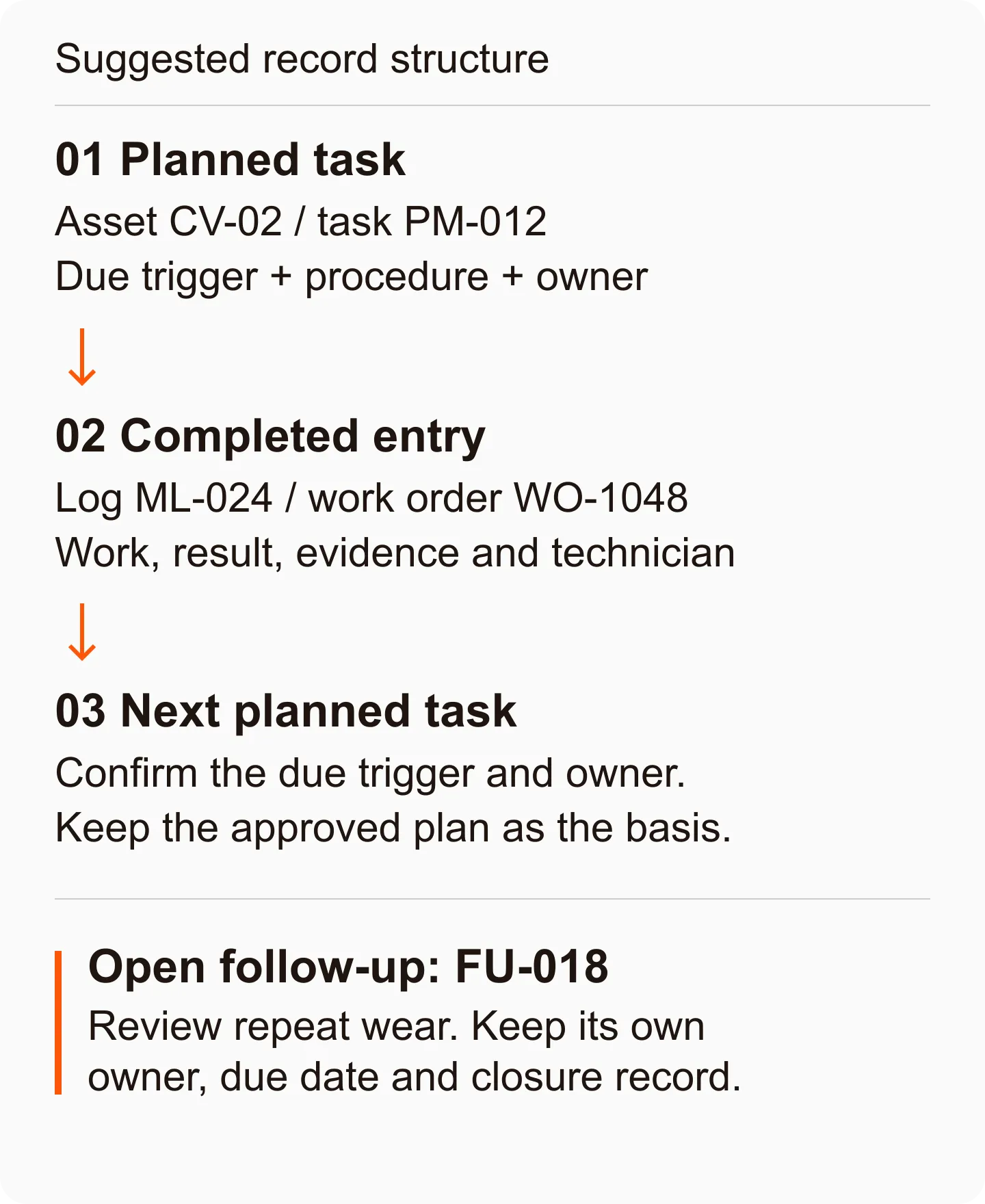
Avoid a blanket rule that every repair resets the preventive maintenance clock. Replacing one bearing does not establish that every task in a full service was completed. Keep the existing due date unless the approved plan and the work performed justify changing it.
If a task is overdue or deferred, retain the original due date and record the decision, reason and owner. Moving the date alone hides the missed work. If a meter is replaced or reset, record that change too, so a lower reading is not mistaken for less use.
Word, Excel or a printed log sheet?
Choose the format around how the record will be completed and reviewed.
| Format | Useful when | Set it up carefully |
|---|---|---|
| Word | Each visit needs a readable service report with room for notes | Reuse the same field names and file the completed report under its asset and entry references |
| Excel | You want to review entries across several machines | Use one row per entry, separate columns for dates and numbers, and links to longer reports |
| Printed PDF | The technician needs a sheet at the equipment | Make space for legible findings and define where the completed sheet will be stored |
For a maintenance log template in Word, copy the worked example’s field labels into a two-column form and leave enough space for the work and result. For Excel, use those labels as columns, but keep multi-part checklists in a linked record rather than squeezing them into one cell.
Bulk’s linked download is a PDF. It is not an Excel workbook or a Word document. If your team works with laboratory equipment, WHO also provides an equipment maintenance logbook template in Excel. Check its suitability for your equipment before adopting it.
Make the record useful at the next handover
Before rolling out the form, ask someone who did not perform the work to read one completed entry. They should be able to identify the machine, find the evidence, understand its current status, and name the person responsible for anything still open.
Keep the original entry when correcting a mistake. Record what changed, who changed it and why. Review repeat faults by asset and symptom, and read the underlying notes before treating similar descriptions as the same failure. If operators run daily checks from a TPM checklist, file the defects they find against the same asset so the history stays in one place.
When checks and evidence need to stay attached to an asset, Bulk’s Audits app is relevant: its maintenance-audit records bring together the asset, checklist responses and supporting evidence. Start by checking that flow against the work your technicians actually need to record.
For now, take one recently completed job and fill in the maintenance log PDF. Add a clear result, the next task and any open follow-up. The next shift should be able to act on the record without reconstructing the visit.